
Output tiers
1K · 1.5K · 2K
Or custom W×H from 921,600 to 4,624,220 pixels. 1.5K is billed at the 1K price.
ByteDance Seed · Seedream 5.0 Flash
Pro-grade editing and layers, at Flash speed and cost.
Seedream 5.0 Flash (doubao-seedream-5-0-flash-260915) is the fast, cost-efficient tier of ByteDance's Seedream 5.0 family. It keeps the signature Seedream 5.0 capabilities — edits placed exactly where you point, layer decomposition into transparent PNGs and native multilingual text — while generating faster and costing less. APIPod exposes it as three API models behind one key: text-to-image, edit and layer.
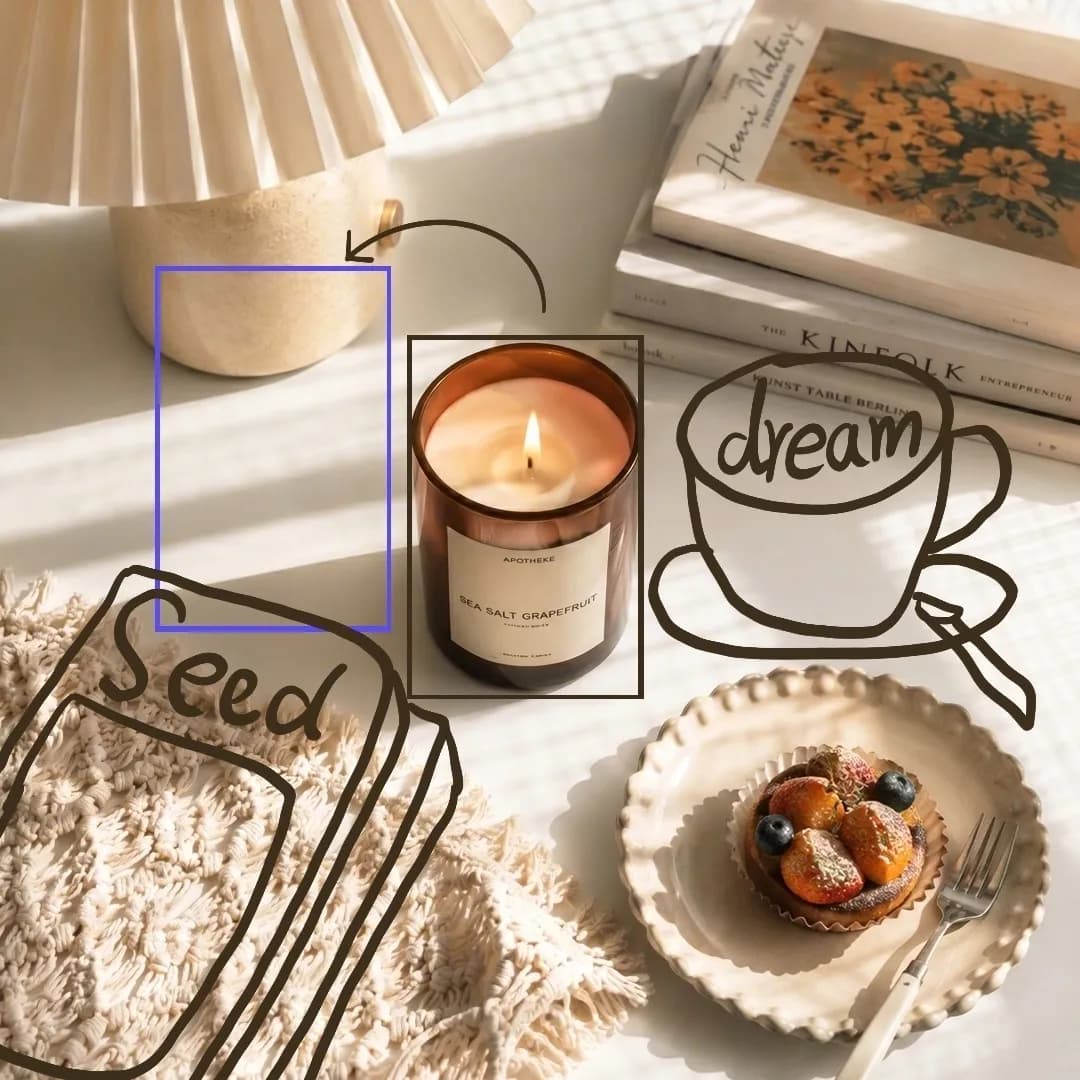 Input with sketch marks
 Output
Prompt
Edit the image based on the hand-drawn sketch. Add a stack of realistic magazines or art books in the marked area at the lower left, and add a ceramic cup of coffee with a saucer in the marked area on the right. Remove all sketch lines. Keep the composition unchanged.
Output tiers
1K · 1.5K · 2K
Or custom W×H from 921,600 to 4,624,220 pixels. 1.5K is billed at the 1K price.
Reference images
Up to 10
Multi-image fusion, subject placement, material and garment swaps.
Layer decomposition
Base + 16 layers
Transparent PNG layers with z-index, bounding box, name and description.
Native text languages
14 new
Including Japanese, Korean, Arabic, Thai, Vietnamese, Russian, Spanish, French and German.
ByteDance positions Flash for latency- and cost-sensitive scenarios. It shares the Seedream 5.0 Pro feature set, so the decision is about throughput and budget, not missing capabilities.
Generate catalog shots, ad variants and social creatives at scale. Faster turnaround and the cost-efficient Flash tier make large batch jobs and A/B creative testing practical.
Turn clicks and drag-boxes in your own canvas into <point> and <bbox> coordinates. Faster responses keep point-and-edit tools feeling responsive for end users.
Split posters, covers and banners into a clean base plus transparent layers, then swap copy, products or colors programmatically to build reusable templates.
Render on-image typography natively in more than a dozen languages, so one master design can be produced for every market without a manual retouching pass.
Interactive editing
Seedream 5.0 Flash understands positions inside the prompt. Mark a spot, a box or a free-hand sketch and the model edits only that area, blending the result into the original scene.
| Use it to | Prompt pattern |
|---|---|
| Edit the object near a point | Replace the object at Image 1 <point>520 460</point> with a crown |
| Edit everything inside a box | Replace the area Image 1 <bbox>120 180 640 760</bbox> with a garden |
| Move a subject across images | Place the subject at Image 1 <bbox>179 283 796 986</bbox> into Image 2 <bbox>118 331 933 871</bbox> |
| Protect an area from changes | Replace Image 1 <bbox>120 180 640 760</bbox> with a garden; keep Image 1 <bbox>700 120 920 360</bbox> unchanged |
Coordinates are normalized to the image: the top-left corner is 0,0 and the bottom-right corner is 999,999, independent of the real pixel size. Convert a click with x = round(x_px / width × 1000) and y = round(y_px / height × 1000).
Click → normalized <point>
// Convert a click on a displayed image into a Seedream <point> tag
function toPoint(event, img) {
  const rect = img.getBoundingClientRect();
  const x = Math.round(((event.clientX - rect.left) / rect.width) * 1000);
  const y = Math.round(((event.clientY - rect.top) / rect.height) * 1000);
  const clamp = (v) => Math.min(999, Math.max(0, v));
  return `<point>${clamp(x)} ${clamp(y)}</point>`;
}
When a box covers several subjects, name the target in words — for example “the person on the left” — so the model edits the right one.
Layer decomposition
Send a single image to seedream-5.0-flash-layer and get a base image plus up to 16 transparent PNG layers. Let the model find the main elements automatically, describe what to extract, or target exact regions with <bbox> coordinates.
 Input (no prompt)
 Base image
 Layer 1
 Layer 2
 Layer 3
Use a general instruction and the model identifies subjects, text, background and decorations on its own.
Name what you need, e.g. “extract the person, the title text and the icon in the lower-right corner.”
Pass <bbox>x1 y1 x2 y2</bbox> tags (0–999 normalized) for every element that must become its own layer.
Each layer comes with z_index and a normalized bounding_box. On a W×H canvas, place it at x = left / 1000 × W, y = top / 1000 × H and scale it to (right − left) / 1000 × W by (bottom − top) / 1000 × H.
Layer decomposition is billed once per request, no matter how many layers are returned.
All three map to the same upstream model, doubao-seedream-5-0-flash-260915, and run through APIPod's asynchronous image API.
| Model ID | Mode | Input | Output | |
|---|---|---|---|---|
| seedream-5.0-flash | Text to image | Prompt | 1 image, 1K / 1.5K / 2K, PNG or JPEG | Open model |
| seedream-5.0-flash-edit | Editing, fusion & interactive edits | Prompt + 1–10 reference images | 1 image; transparent PNG for a single transparent input | Open model |
| seedream-5.0-flash-layer | Layer decomposition | Exactly 1 image + optional prompt | Base image + up to 16 transparent PNG layers with metadata | Open model |
Same capabilities, different trade-off. ByteDance describes Pro as the higher-quality option and Flash as faster and cheaper.
| Spec | Seedream 5.0 Flash | Seedream 5.0 Pro |
|---|---|---|
| Upstream model | doubao-seedream-5-0-flash-260915 | doubao-seedream-5-0-pro-260628 |
| Best for | Latency- and cost-sensitive workloads | Scenes that demand the highest image quality |
| Prompt optimization | Standard mode | Standard and fast modes |
| Output tiers | 1K / 1.5K / 2K, custom W×H | 1K / 1.5K / 2K, custom W×H |
| Interactive editing | Points, boxes, arrows, sketches | Points, boxes, arrows, sketches |
| Layer decomposition | seedream-5.0-flash-layer | seedream-5.0-pro-layer |
| Reference images | Up to 10 | Up to 10 |
Neither model supports group (sequential) generation, web search or streaming output — use Seedream 5.0 Lite for those.
Explore the Seedream 5.0 Pro APIPricing
ByteDance prices Flash below Pro as the cost-efficient Seedream 5.0 tier. The live APIPod price of every model is shown on its model card and on the pricing page.
Billed per output image. 1.5K is priced the same as 1K.
Billed per output image. The first input image is free; each additional reference image adds a small per-image fee.
One fixed price per request, regardless of how many layers are returned.
Failed tasks are refunded automatically. Prices are in USD.
See full pricingOfficial examples
Before-and-after examples from the official Seedream 5.0 pro / flash tutorial. Both models share these capabilities, so the same prompts work with the Flash model IDs.
 Input
Input Output
Prompt
Place the subject at Image 1 <bbox>179 283 796 986</bbox> into the position Image 2 <bbox>118 331 933 871</bbox>.
 Input
Input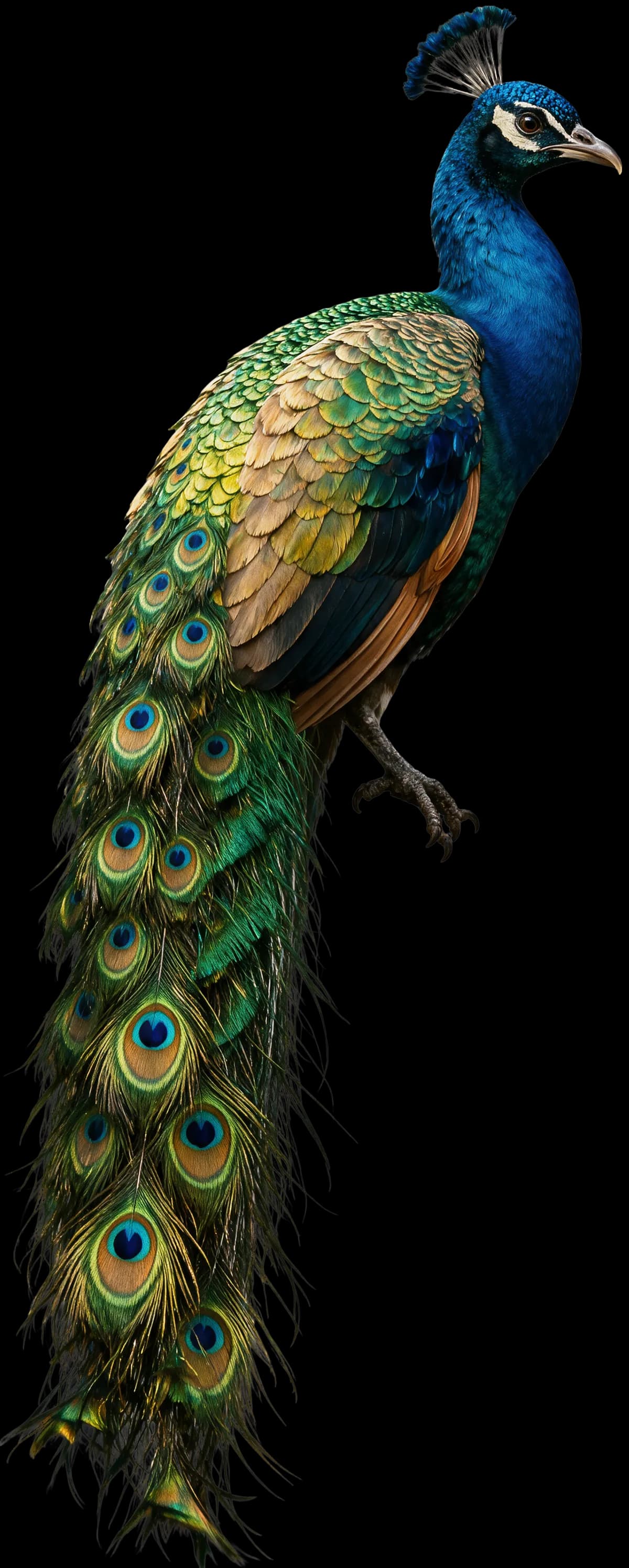 Output
Prompt
Change the parrot in the image into a peacock.

Seedream 5.0 pro / flash add native text rendering for 14 more languages: Russian, Arabic, Filipino, Thai, Turkish, Korean, Malay, Spanish, Portuguese, Indonesian, French, German, Vietnamese and Japanese.
Images and prompts: Volcano Engine Ark / BytePlus ModelArk, “Seedream 5.0 pro / flash tutorial”. Prompts translated from the official Chinese originals where no English version was published.
Quickstart
Submit a task, poll its status and read the result. Switch between generation, editing and layer decomposition by changing the model ID.
For seedream-5.0-flash-layer the result also includes an images array with z_index, bounding_box, name and description for every layer. Full parameters are in the Seedream 5.0 Flash docs.
import os, time, requests

headers = {"Authorization": f"Bearer {os.environ['APIPOD_API_KEY']}"}
payload = {
  "model": "seedream-5.0-flash-edit",   # or seedream-5.0-flash / seedream-5.0-flash-layer
  "prompt": "Replace the area Image 1 <bbox>120 180 640 760</bbox> with a garden",
  "image_urls": ["https://example.com/room.png"],
  "quality": "2K",                      # 1K / 1.5K / 2K
  "aspect_ratio": "16:9",
}

resp = requests.post("https://api.apipod.ai/v1/images/generations", json=payload, headers=headers)
task_id = resp.json()["data"]["task_id"]

while True:
  data = requests.get(f"https://api.apipod.ai/v1/images/status/{task_id}", headers=headers).json()["data"]
  if data["status"] in ("completed", "failed"):
    print(data["status"], data.get("result"))
    break
  time.sleep(2)
Seedream 5.0 Flash is the fast, cost-efficient tier of ByteDance Seed's Seedream 5.0 image family (upstream model doubao-seedream-5-0-flash-260915). It supports text-to-image, single- and multi-image editing, interactive editing with coordinates, layer decomposition and native multilingual text, and is designed for latency- and cost-sensitive scenarios.
Create an APIPod API key and send a request to /v1/images/generations with model set to seedream-5.0-flash, seedream-5.0-flash-edit or seedream-5.0-flash-layer. Tasks are asynchronous: poll /v1/images/status/{task_id} or pass a callback_url to receive the result.
They share the same features — generation, multi-image editing, interactive editing, layer decomposition, transparent backgrounds and multilingual text. Pro delivers higher image quality and offers an extra fast prompt-optimization mode; Flash generates faster at a lower price and uses the standard prompt mode.
Add <point>x y</point> or <bbox>x1 y1 x2 y2</bbox> tags to the prompt of seedream-5.0-flash-edit. Coordinates are normalized from 0,0 at the top-left to 999,999 at the bottom-right of each reference image, so you can convert clicks or drag-boxes from your UI directly. Free-hand marks drawn on the image also work.
Send exactly one image to seedream-5.0-flash-layer. The model returns a base image plus up to 16 transparent PNG layers; each item includes z_index (0 is the base), a bounding_box in pixel and normalized coordinates, a name and a description. Size accepts auto, 1K, 1.5K or 2K, and auto keeps each layer at its original size.
Choose 1K, 1.5K or 2K with aspect ratios 1:1, 4:3, 3:4, 16:9, 9:16, 3:2, 2:3 or 21:9, or pass a custom size between 921,600 and 4,624,220 total pixels. Output is PNG or JPEG, one image per request.
Yes. With seedream-5.0-flash-edit, set background to transparent and provide exactly one image that already has an alpha channel; the result is a PNG. Layers returned by seedream-5.0-flash-layer are always transparent PNGs.
APIPod bills Seedream 5.0 Flash per output image with no subscription, and 1.5K costs the same as 1K. For editing, the first input image is free and extra reference images carry a small fee. Layer decomposition is a fixed price per request. Current prices are on each model card and the pricing page; failed tasks are refunded automatically.
One API key for Seedream 5.0 Flash, Pro and hundreds of other image, video and language models — pay as you go, with failed tasks refunded automatically.