APIPod logoAPIPod

OpenAI · GPT Image family

GPT Image 2, 2.5 or 2.6 — which one fits?

All three are OpenAI image models that share the same request shape, so switching is a one-line model change. What differs is speed, editing precision, the formats you can ship and the price. This page helps you pick in a minute.

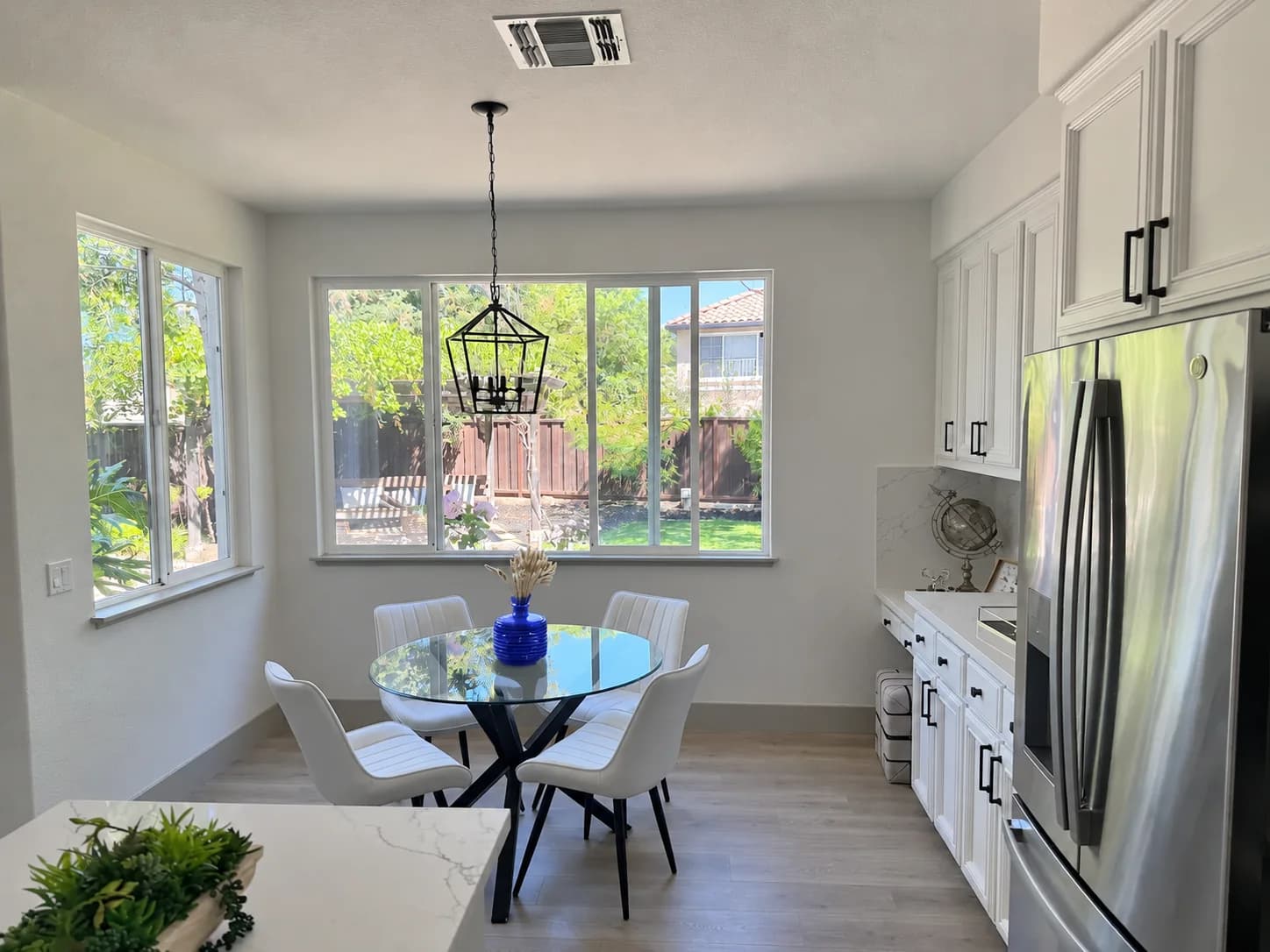
GPT Image 2.6 Flare markup-guided edit: the striped vase inside the red circle turned into solid cobalt-blue ceramic
Official example · GPT Image 2.6 Flare: only the striped vase inside the red circle becomes cobalt-blue ceramic; the stems and the rest of the kitchen stay untouched.

01/Side by side

Three generations, one table

Positioning, tiers, output formats and billing, row by row. Each series page has the full parameters and examples.

01

GPT Image 2

What it is
The first image model with reasoning; ~99% text-rendering accuracy
Tiers & editions
Single model; 2K / 4K automatically use the Pro variant
What you get
Still images up to 4K, 11 aspect ratios
Quality levels
1K / 2K / 4K
Reference images
Up to 16, with characters and style kept consistent across images
Billing
By resolution tier and usage — see the pricing page
Best for
Text-heavy visuals: menus, posters, UI screenshots
View series
02

GPT Image 2.5

What it is
Flare is fast (~50% lower latency than GPT Image 2); Sunburst is precise (multi-round edits never drift)
Tiers & editions
Flare / Sunburst, each in Official and Lite editions
What you get
Still images up to 4K, 16 aspect ratios, transparent PNG
Quality levels
auto, low, medium, high plus exclusive xhigh / max
Reference images
Up to 16, with stronger subject preservation
Billing
Official: token-based ($0.50 held, then settled). Lite: per image — 1K $0.02 / 2K $0.06 / 4K $0.10
Best for
High-volume generation, product retouching, fixed per-image budgets
View series
03

GPT Image 2.6

What it is
All of 2.5, plus looping GIF, editable SVG, complexity planning and markup-guided editing
Tiers & editions
Flare / Sunburst, each in Official, HD and Lite editions
What you get
PNG / JPEG / WebP / GIF / SVG (SVG on Official only; GIF on Official and Lite)
Quality levels
Five levels from low to max, plus low / medium / high complexity
Reference images
Reference-image editing, plus a markup layer to circle what to change
Billing
Official: token-based ($0.50 held). HD and Lite: per image — see the pricing page
Best for
Social animations, vector logos and icons, print-grade hero images
View series

Prices come from each model page; account-level discounts apply. See the pricing page for current numbers.

02/Pick by need

Start with what you need, then pick the model

Most requests map to a model in one sentence. Here are the six most common.

  1. A looping GIF animation

    PickGPT Image 2.6 Lite or Official

    Lite costs less; Official matches OpenAI's output exactly.

  2. An editable SVG logo or icon

    PickGPT Image 2.6 Official

    Only Official returns SVG, with paths and colors you can edit later.

  3. Large batches at a fixed price

    PickGPT Image 2.5 Lite / 2.6 Lite

    Per-image pricing you know upfront; 2.5 Lite is $0.02 per 1K image.

  4. Product shots or key visuals with many revisions

    PickSunburst (2.5 or 2.6)

    Changes only the area you point to, and holds up across rounds.

  5. Speed and high concurrency

    PickFlare (2.5 or 2.6)

    The recommended default, with ~50% lower latency than GPT Image 2.

  6. Not sure yet

    PickStart with GPT Image 2.6 Flare Official

    All three share one request shape — switch later with a single model change.

03/Editions

Why does one model come in several editions?

Editions take exactly the same parameters. They differ in routing channel, supported formats and billing. Switch by changing the model ID.

Official

Relayed through OpenAI's official API on both 2.5 and 2.6

Billing

OpenAI's official token rates: $0.50 is held on submission and settled against actual usage; any excess is refunded.

  • Identical output to OpenAI's own API
  • Low and medium quality are often cheaper than per-image — 2.5 Official at 1K · low is about $0.006 per image
  • The only 2.6 edition that returns SVG

Best forCommercial delivery, brand assets, anything that must match OpenAI exactly

Lite

Model IDs end in -lite on both 2.5 and 2.6

Billing

Flat per-image price charged once on submission. 2.5 Lite: 1K $0.02, 2K $0.06, 4K $0.10. 2.6 Lite: see the pricing page.

  • High quality and 4K are much cheaper — 2.5 Lite at 4K · max is $0.10 per image
  • 2.6 Lite supports GIF but not SVG
  • Lower-cost channels; output is close to Official with possible minor differences

Best forBatch generation, creator assets, cost-sensitive workloads

HD

GPT Image 2.6 only; model IDs end in -hd

Billing

Per-image price charged once on submission — see the pricing page.

  • Same prompt, sharper and higher-fidelity bitmaps
  • PNG, JPEG and WebP only — no GIF or SVG
  • Quality levels, complexity and reference editing work as on Official

Best forPrint, large-format posters, product hero images

Account-level discounts apply to every edition. See the pricing page for current numbers.

04/API

One endpoint — change the model, change the generation

All three generations use POST /v1/images/generations. Swap the model in this request for any ID on the right to switch model and edition.

POST /v1/images/generations
curl -X POST https://api.apipod.ai/v1/images/generations \
  -H "Authorization: Bearer $APIPOD_API_KEY" \
  -H "Content-Type: application/json" \
  -d '{
    "model": "gpt-image-2.6-flare",
    "prompt": "A cobalt-blue ceramic mug on a pale gray studio backdrop, soft light from the left",
    "quality": "high",
    "aspect_ratio": "1:1",
    "resolution": "2K"
  }'

Available model IDs

GPT Image 2

  • gpt-image-2

GPT Image 2.5

  • gpt-image-2.5-flare
  • gpt-image-2.5-sunburst
  • gpt-image-2.5-flare-lite
  • gpt-image-2.5-sunburst-lite

GPT Image 2.6

  • gpt-image-2.6-flare
  • gpt-image-2.6-sunburst
  • gpt-image-2.6-flare-hd
  • gpt-image-2.6-sunburst-hd
  • gpt-image-2.6-flare-lite
  • gpt-image-2.6-sunburst-lite

For GIF or SVG on 2.6, add the output_format parameter. See the API docs for reading results.

Read the API docs

05/FAQ

About the GPT Image family

01What is the difference between GPT Image 2, 2.5 and 2.6?

Each builds on the last. GPT Image 2 is the first image model with reasoning, with ~99% text-rendering accuracy and output up to 4K. 2.5 splits into Flare (speed, ~50% lower latency than 2) and Sunburst (precise editing), and adds exclusive xhigh / max quality. 2.6 keeps everything in 2.5 and adds looping GIFs, editable SVGs, a complexity control and markup-guided editing.

02Which one should I use?

Need GIF animation or SVG vectors? Use 2.6. Only still images at a fixed price? 2.5 Lite is the simplest (from $0.02 per 1K image). Pick Flare for speed and Sunburst for repeated refinement. If unsure, start with 2.6 Flare Official — all three share one request shape, so switching later is a one-line change.

03How is the GPT Image family billed?

Official editions use OpenAI's token rates: $0.50 is held on submission and settled against actual usage, with any excess refunded. 2.5 Lite is a flat per-image price: 1K $0.02, 2K $0.06, 4K $0.10, regardless of quality level. 2.6 HD and Lite are billed per image, and GPT Image 2 is billed by resolution tier — see the pricing page for current numbers.

04What is the difference between Official, Lite and HD?

They take the same parameters but differ in channel, formats and billing. Official goes straight to OpenAI, matches its output exactly, is token-billed, and is the only 2.6 edition that returns SVG. Lite uses lower-cost channels with per-image pricing and near-official output; 2.6 Lite supports GIF. HD exists only on 2.6 and returns sharper bitmaps, without GIF or SVG.

05Do I need to change code to upgrade?

Barely. 2.5 shares GPT Image 2's request shape and 2.6 keeps it, so upgrading is a model change — for example gpt-image-2.5-flare to gpt-image-2.6-flare. Add output_format and related parameters only when you want new capabilities such as GIF or SVG.

06Can I use the generated images commercially?

Yes. Images generated through APIPod can be used in commercial projects, subject to OpenAI's usage policies and applicable content guidelines.

Get started

One API key, every GPT Image generation

Create a key and call every model and edition, paying only for what you use.