

Output
5 formats
PNG / JPEG / WebP / GIF / SVG, switched with a single output_format field.

GPT Image 2.6 is a new-generation image generation model released by OpenAI on November 4, 2026. It consists of two sub-models: Flare (Speed Version) and Sunburst (High-Precision Version). Based on GPT Image 2.5, it adds GIF and SVG image output formats, with its inference speed doubled!
OpenAI · GPT Image 2.6
Released November 4, 2026 · Two tiers: Flare and SunburstFor the first time, an image model delivers motion and vectors — not just a flat bitmap.
GPT Image 2.6 keeps everything from 2.5 and adds looping GIF animation, editable SVG vector output, a complexity control and markup-guided editing. Flare trades compute for iteration speed; Sunburst trades latency for production detail. Both share one request shape and their own public model IDs.
Output
5 formats
PNG / JPEG / WebP / GIF / SVG, switched with a single output_format field.
GIF frames
2–64
Paired with a 20–2000ms per-frame duration to control loop rhythm.
Model tiers
2 tiers
Flare optimizes for speed, Sunburst for precision; identical parameters.
Planning depth
3 levels
low / medium / high control how much the model plans before rendering, at no extra charge.

Example prompt
A monkey in a green coat lifts a glowing lantern in front of a snowy cabin, blinks, then lowers it again. The motion returns to the starting pose so the clip loops seamlessly; the warm lantern light spills softly across the snow, and the background stays quiet.
Official example: Sunburst generated this lantern animation with frame_count=9 and frame_duration_ms=200 — 1.8 seconds that loop seamlessly.
output_format decides what comes back. Bitmaps suit photography and compositing, GIF suits social and micro-interactions, SVG suits logos, icons and illustrations you need to edit again.
Lossless bitmap
PNG
Keeps the alpha channel — the default for transparent product cutouts and the safest path for editing and compositing.
Fastest bitmap
JPEG
The quickest and smallest bitmap option for latency-sensitive batches. No transparency.
Web bitmap
WebP
Balances size and quality, supports transparency and a custom output_compression value.
Looping animation
GIF
A complete looping animation from one prompt, returned as b64_json you can write straight to a .gif file.
Editable vector
SVG
Static vector XML with editable paths, shapes and colors. No scripts or external resources.
GIF and SVG are only available from the generation endpoint — image edits return neither — and both ignore output_compression.
Set output_format to gif, then describe the subject, the motion and how the loop should close. What comes back is a finished animation, not a still you have to frame yourself.
Official example prompt (translated)
A monkey in a green coat lifts a glowing lantern in front of a snowy cabin, blinks, then lowers it again. The motion returns to the starting pose so the clip loops seamlessly; the warm lantern light spills softly across the snow, and the background stays quiet.
Three fields drive the animation
frame_count2–64 framesframe_duration_ms20–2000mssizeauto / multiples of 16Writing prompts that loop
Limits
Set output_format to svg and the model renders a reference bitmap, then converts it to vectors. The result is plain static XML — no scripts, external resources or embedded rasters — ready for a design tool or your front end.
GPT Image 2.6 Flare

GPT Image 2.6 Sunburst

Official example prompt (translated)
Create an original, non-infringing logo for Field & Flour, a local bakery. It should feel warm, simple and timeless: clean vector-like shapes, a strong silhouette, balanced negative space. Favor simplicity over detail so it reads at both small and large sizes. Flat design, minimal strokes, no gradients unless essential. Fully transparent background, a single centered logo with generous padding, clean alpha edges, and no solid backdrop, scenery, checkerboard or watermark.
When to choose SVG over PNG
Parameter rules
Overlay an annotation layer on a reference image — a circle, box or arrow — then describe the change in the prompt. The model locks onto the region more reliably and leaves the rest of the frame untouched.
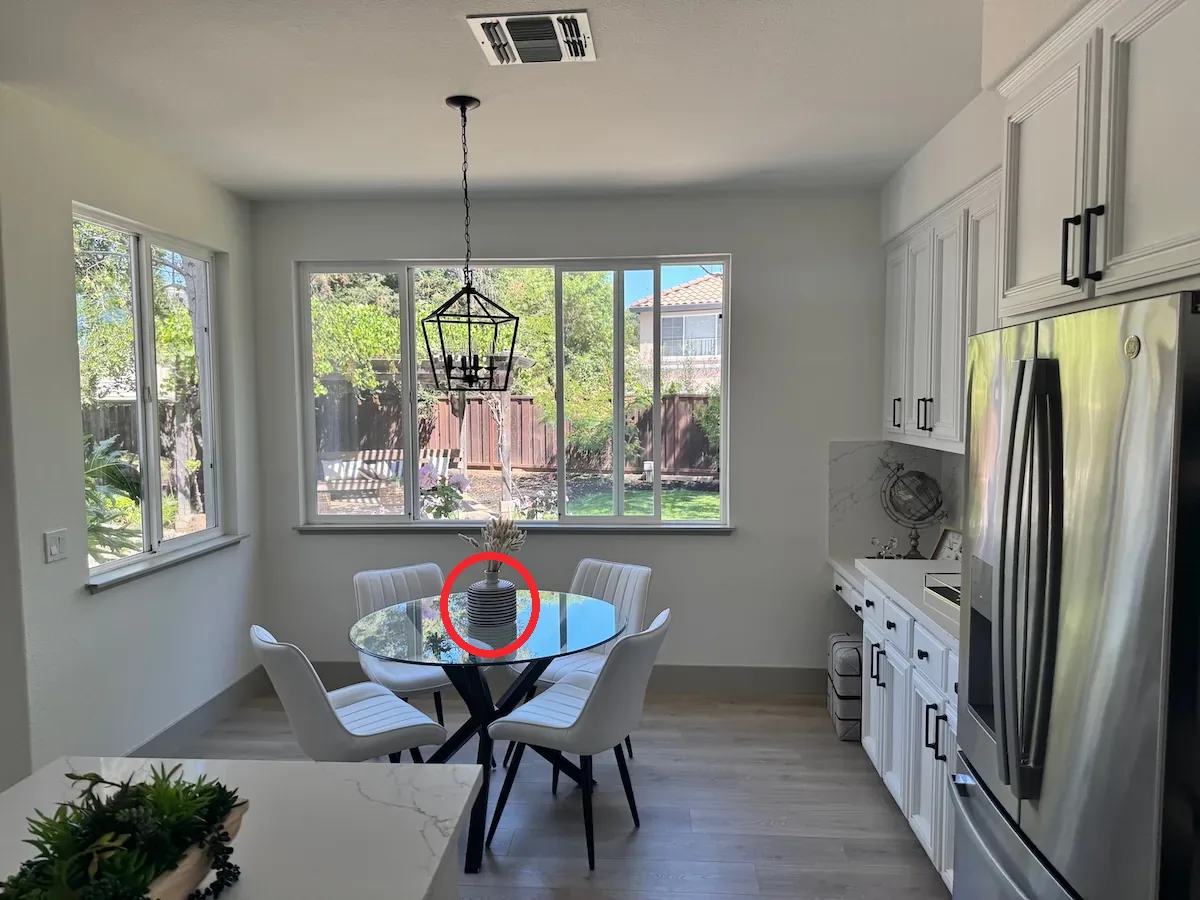
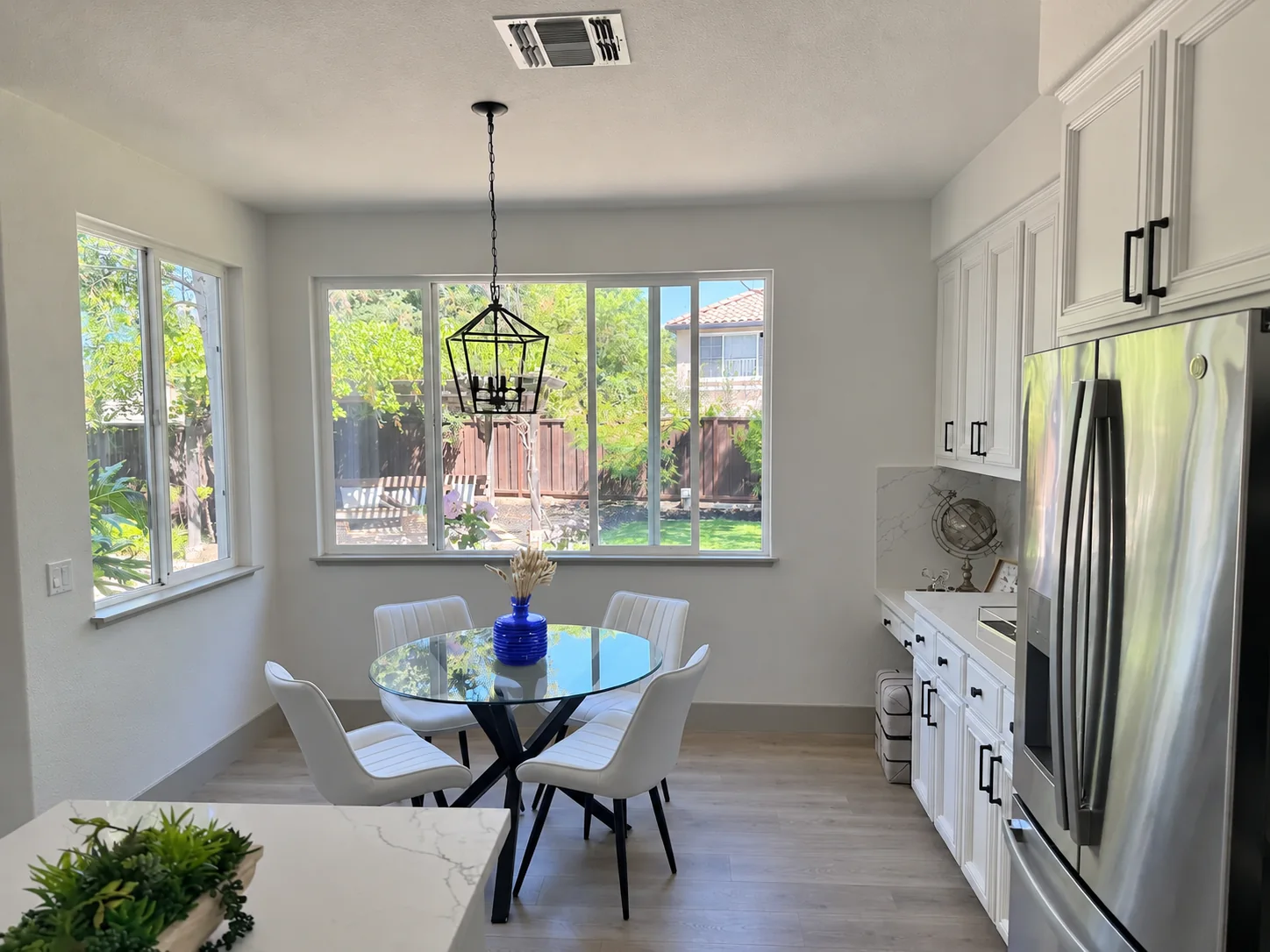
Official example prompt (translated)
Recolor the striped vase inside the red circle to solid cobalt blue ceramic. Keep its shape, the dried stems and the rest of the kitchen unchanged. Remove the red circle from the finished photo.
Prepare a clean reference image and a transparent PNG overlay that circles the target region.
Submit both as multipart files: image plus markup, which travels on its own channel.
In the prompt, state what to change and what must stay, and ask for the annotation to be removed.
complexity controls how much the image model plans before rendering. It is a separate axis from quality: quality decides how finely it renders, complexity decides how deeply it reasons. Changing it costs nothing extra.

low
Focused edits with one clear target — swap a background, repaint a sign. Faster and cheaper.

medium
The balance point for everyday campaign assets and multi-element compositions.

high
The default: dense text, complex layouts and relationships between objects. Costs latency and may introduce unwanted changes.
The same prompt can compose differently at different complexity levels — in OpenAI's example, low kept only the trophy and banner while high filled in the jerseys and the stands. Compare results when switching; higher is not automatically better.
Flare and Sunburst take exactly the same parameters. The difference is how much time the model is willing to spend.
FlareRecommended
Speed tier
The default when response time matters: fast iteration, batch variants and in-product generation.
SunburstPrecision flagship
Detail tier
The choice when detail is worth waiting for: fine visual work, multi-round edits and production-ready assets.
GPT Image 2.6 keeps the GPT Image 2 request shape and adds three fields. Migrating is a model-ID change.
| Field | Values | Notes |
|---|---|---|
| model | gpt-image-2.6-flare / gpt-image-2.6-sunburst | The public model ID that picks the tier. |
| prompt | ≤ 4000 characters | Scene description; for GIF, include subject, motion and the loop target. |
| output_format | png / jpeg / webp / gif / svg | New in 2.6: gif and svg. Both are generation-only. |
| quality | low / medium / high / xhigh / max | Fidelity tier; omitted or auto is sent upstream as high. |
| complexity | low / medium / high | New in 2.6: planning depth; defaults to high. |
| frame_count / frame_duration_ms | 2–64 / 20–2000ms | New in 2.6, only read when output_format=gif. |
| resolution + aspect_ratio | 1K / 2K / 4K × 15 ratios | Converted to upstream pixel sizes. |
| size | auto, or WIDTHxHEIGHT (multiples of 16) | GIF frame size. Optional — leave it empty to derive it from resolution + aspect_ratio. Because GIF frames are budgeted together (frames x pixels must fit the per-request limit), APIPod automatically scales the frame size down as frame_count grows, keeping the aspect ratio and 16-alignment. |
| moderation | low / auto | Moderation strictness. APIPod defaults to low to reduce false blocks; pass auto for OpenAI's default filtering. |
| background | auto / opaque / transparent | Transparent needs quality ≥ medium and only works through reference-image edits. |
GIF, SVG and bitmaps share the same /v1/images/generations endpoint — swap output_format.
import base64, requests

resp = requests.post(
    "https://api.apipod.ai/v1/images/generations",
    headers={"Authorization": "Bearer $API_KEY"},
    json={
        "model": "gpt-image-2.6-sunburst",
        "prompt": "A monkey in a green coat lifts a glowing lantern, blinks, then lowers it; the loop returns to the starting pose.",
        "output_format": "gif",
        "frame_count": 9,
        "frame_duration_ms": 200,
        "quality": "high",
    },
)
data = resp.json()["data"][0]["b64_json"]
open("lantern.gif", "wb").write(base64.b64decode(data))
The response's data[0].b64_json is the base64 payload: write it to .gif, .svg or the bitmap's own extension.
Get an API keyGIF animation
"output_format": "gif"SVG vector
"output_format": "svg"Bitmap
"output_format": "png"How GPT Image 2.6 works on APIPod.
GPT Image 2.6 is the next generation of OpenAI's image family, released November 4, 2026 as two tiers, Flare and Sunburst. On top of 2.5 it adds native GIF animation output, native SVG vector output and a complexity control; the edit path also accepts markup overlays.
Set output_format to gif on /v1/images/generations and describe the subject, motion and loop target in the prompt. Optionally set frame_count (2–64, default 9) and frame_duration_ms (20–2000, default 200) to control the rhythm. Decoding data[0].b64_json gives you the finished GIF. GIF does not support image edits, streaming or custom compression.
The model renders a reference bitmap and converts it to vectors, so the quality tier directly shapes how much detail survives. The result is static XML with no scripts, external resources or embedded rasters — good for logos, icons and illustrations. The edit endpoint does not return SVG.
Check three things: output_format is explicitly set to gif; the request did not go through the image edit endpoint (GIF is generation-only); and data[0] returns b64_json rather than a URL. APIPod sniffs the artifact header and stores it with the correct Content-Type, so a PNG result normally means the parameter never reached the upstream.
quality controls rendering fidelity (low / medium / high / xhigh / max); complexity controls how much the model plans before rendering (low / medium / high). The first affects fine detail, the second affects composition completeness and latency. Adjusting complexity costs nothing extra, and it defaults to high.
You overlay a transparent annotation layer on a reference image — circles, boxes or arrows marking the target — and describe the change in the prompt. The edit endpoint receives the overlay on its own channel, which lets the model lock onto the region while leaving the rest untouched and removing the annotation marks.
With the same token model as bitmaps: a hold at submission and a settle-up on completion, refunding the difference. GIF frame count and dimensions, and the SVG's reference image plus vector tokens, all show up in the final usage — more frames or larger sizes cost more. Check the pricing page for current rates.
Only the model ID: gpt-image-2.5-flare becomes gpt-image-2.6-flare, and the same for sunburst. Existing parameters, endpoints and response fields are compatible; add output_format=gif/svg, complexity or the frame_* fields when you want the new capabilities.
Bitmaps, animation and vectors — one API key, one request shape.