
ByteDance Seed · text to image and editing
Four generations of Seedream, proofed side by side.
From 4.5 to 5.5, ByteDance split one image family into four tiers: the cheap one, the fast one, the sharpest one, and the newest one. They share one endpoint and one API key — what differs is resolution ceiling, reference-image count, transparent output, and how well edits hold up. This page lays them out together, with official samples.



A rabbit taking an underwater selfie: materials and ambient light
01 / 08The lineup
- DEC 2025Seedream 4.5
- FEB 2026Seedream 5.0 Lite
- JUL 2026Seedream 5.0 Pro
- NOV 2026Seedream 5.5
Four tiers, one call path.
The order below is by release, not by recommendation. Pick by what you need: 4.5 is the only one that reaches 4K, 5.0 Flash is the cheapest per image, 5.0 Pro is built for infographics and layout, and 5.5 is the only generation with native transparency and 100-round editing.
Prices come from APIPod's live pricing config, in USD per image at the lowest tier. Full tier pricing is below, or open any series page.
02 / 08Official samples
Don't read the specs. Look at the proofs.
Every image below was published by ByteDance Seed or the Volcengine Ark docs, filed by model. Open any one to read its official prompt — copy it and change what you need.
Samples show where the quality and capability ceilings sit; they don't promise the same result for any prompt. Entries marked as having no official prompt come from vendor showcase pages and include the image alone.
03 / 08Signature · native transparency
Transparent output, without a second cutout pass.
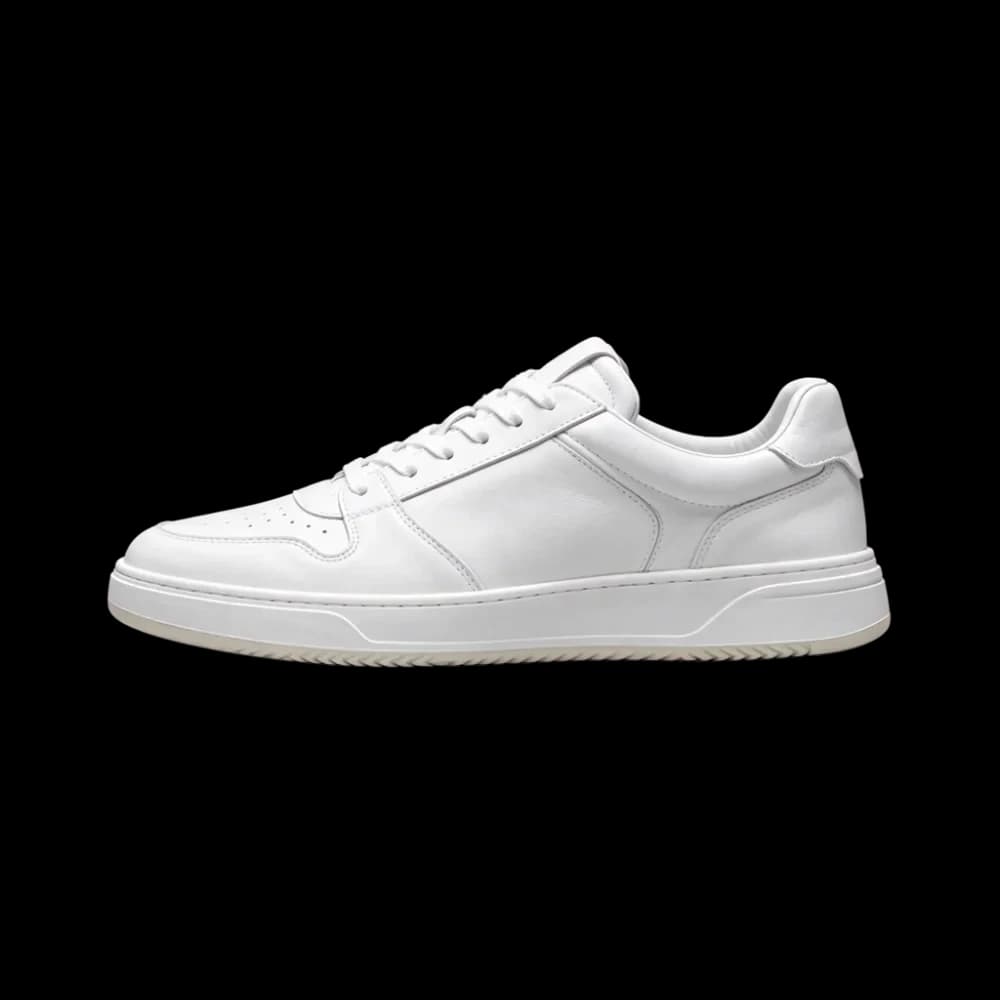
Seedream 5.5 returns PNGs with a real alpha channel. It isn't drawing on white and guessing where the edge is — the background is a separate transparent layer from the start. Product cutouts, stickers and asset compositing no longer need an extra removal step.
- 01
One sentence to cut out
Ask it to extract the sneaker on its own and drop the backdrop and floor shadow; you get a transparent PNG back, with the laces and outsole detail intact.
- 02
The background is genuinely empty
The file carries an alpha channel. Flip to a solid backdrop to confirm: no white fringe, no bounced environment colour, and soft shadows survive.
- 03
No fringe, no halo
The pale rim that ordinary cutouts leave against dark backgrounds doesn't appear here, because the layers were never flattened together.
background: "transparent" · output_format: "png"
04 / 08Signature · stable editing
Edit it a hundred times. Everything else stays put.
The hard part of multi-turn editing isn't making the change — it's not dragging the whole frame along with it. Seedream 5.5 keeps unedited regions pixel-identical across up to 100 rounds, so long design revisions don't slowly drift. Drag the slider to see one round.

 After one round
Same cafe scene: the prompt only changed weather and light, while composition, chair placement and the chalkboard text stayed fixed.

And you can pull the result apart
The layer model decomposes a finished image into a base plate plus transparent layers, each editable on its own — you get working assets instead of one flat file.
100 rounds is the vendor ceiling. How many you actually get depends on how aggressive each change is — small refinements hold far longer than large restructures.
05 / 08Spec sheet
All four tiers, one table.
Rows are capabilities, columns are models, ordered oldest to newest. Scan a row and the difference is usually not a number — it's whether the tier supports the thing at all.
| Capability | Seedream 4.5 | Seedream 5.0 Flash | Seedream 5.0 Pro | Seedream 5.5 |
|---|---|---|---|---|
| Released | Dec 2025 | 2026 | Jul 2026 | Nov 2026 |
| Positioning | General · high resolution | Speed · low cost | Flagship quality · design | Newest · alpha and long edits |
| Output tiers | 2K · 4K | 1K · 1.5K · 2K | 1K · 1.5K · 2K | 1K · 1.5K · 2K |
| Aspect ratios | 8 ratios, 1:1 – 21:9 | 8 ratios, 1:1 – 21:9 | 8 ratios, 1:1 – 21:9 | 15 ratios, including 1:8 and 8:1 strips |
| Reference images | Multi-image input | Up to 10 | Up to 10 | Up to 10 |
| Transparency | — | Accepts transparent input | Accepts transparent input | Outputs native alpha |
| Multi-turn editing | Supported | Supported; detail drifts over many rounds | Supported; detail drifts over many rounds | 100 rounds, unedited areas preserved |
| Layer decomposition | — | Supported | Supported | Supported, up to 100 layers |
| Text rendering | Strong | Close to Pro | Strong, a dozen languages | Strongest; 0.4% severe text error rate |
| Upstream model | doubao-seedream-4-5 | doubao-seedream-5-0-flash-260915 | doubao-seedream-5-0-pro-260628 | doubao-seedream-5-5 |
An em dash means the tier doesn't offer that capability. Upstream model names are for cross-checking ByteDance and Volcengine Ark docs; APIPod's public model IDs are different.
06 / 08Pricing
Pay per image, straight from balance.
All four tiers bill the same way: per generated image, with failed jobs refunded automatically. Figures track the live pricing config — these are current values.
Seedream 4.5
- Tier price
- 1K $0.04 · 2K $0.04 · 4K $0.06
- Edit model
- Same as text to image
- Layer decomposition
- Not offered
Seedream 5.0 Flash
- Tier price
- 1K / 1.5K / 2K 同价
- Edit model
- Same as text to image
- Layer decomposition
- Billed per image
Seedream 5.0 Pro
- Tier price
- 1K $0.035 · 2K $0.07 · 1.5K $0.035
- Edit model
- First input free, then $0.0025 each
- Layer decomposition
- Billed per image
Seedream 5.5
Recommended- Tier price
- 1K $0.02 · 2K $0.035 · 1.5K $0.02
- Edit model
- $0.008 per input image
- Layer decomposition
- Cap × unit price
Edit models bill per output image, and some tiers charge per input reference image on top. Layer decomposition is charged upfront on the max_images cap you set, regardless of how many layers come back. See each series page and the docs for the exact rules.
07 / 08One endpoint
Change one model value, switch tiers.
All four models go through the same /v1/images/generations endpoint with the same parameter shape. Only the model name and its tier field differ: 5.5 uses resolution, while 4.5 and 5.0 use quality.
curl https://api.apipod.ai/v1/images/generations \
  -H "Authorization: Bearer $APIPOD_API_KEY" \
  -H "Content-Type: application/json" \
  -d '{
  "model": "seedream-5.5",
  "prompt": "A white leather sneaker on a seamless studio backdrop, soft top light",
  "resolution": "2K",
  "aspect_ratio": "1:1",
  "background": "auto"
}'
Image generation is asynchronous: submit and you get a task_id, then poll /v1/images/status/{task_id} for the result. Full parameters live in each model's API reference.
08 / 08FAQ
What people actually ask when choosing.
If your question isn't here, the model docs carry the complete parameter tables for every tier.
Which of the four Seedream tiers should I pick?
Need transparent output or long edit chains? Take 5.5. Need the highest quality for infographics, posters and UI mockups? 5.0 Pro. Need cheap, fast, high-volume drafts? 5.0 Flash. Need 4K output? Only 4.5 does that. If you're unsure, start with 5.5 — it's the best all-rounder today.
What actually differs between 5.0 Pro and 5.0 Flash?
Capabilities are identical: editing, layer decomposition and transparent input all work, and the resolution tiers match. The trade is speed against quality — Flash is faster and cheaper, Pro is more consistent on detail, materials and type layout. Drafting on Flash and finishing on Pro is a common pairing.
What did Seedream 5.5 upgrade over 5.0?
Three things. Native RGBA output, for both text-to-image and editing. Editing stability: unedited regions stay pixel-identical across 100 rounds. And realism — materials, lighting and skin texture land closer to photography, with dense small type error rate down to 0.4%.
Which tier can output 4K?
Only Seedream 4.5, which offers 2K and 4K. 5.0 Pro, 5.0 Flash and 5.5 all top out at 1K / 1.5K / 2K. If you need larger frames, upscale a 2K result or go straight to 4.5's 4K tier.
Do all models support transparent backgrounds?
No. Only 5.5 outputs native transparency, returning PNGs with an alpha channel. 5.0 Pro and 5.0 Flash accept transparent assets as input but still return opaque images; 4.5 has no transparency capability at all.
What does 100 rounds of editing mean — does each round repaint the whole image?
No repainting. Each round changes only the region you specify, and everything else stays fixed at the pixel level. 100 is the vendor's stated ceiling; how many rounds hold up in practice depends on how large each change is — small refinements survive much longer than big restructures.
How is layer decomposition billed? Does the number of layers change the price?
It doesn't. Decomposition is charged upfront on the max_images cap you set, not on how many layers come back — set 30 and you pay for 30 even if it returns 12. Setting a tighter cap is the cheaper default. 4.5 doesn't offer decomposition at all.
Do prices change, and are failures refunded?
Prices track the published pricing config; what you see here is current, and the charge at call time is authoritative. Failed generations are refunded automatically — no support ticket needed.
Can I call it with the OpenAI SDK?
Yes. APIPod's /v1 surface is OpenAI-compatible: point base_url at https://api.apipod.ai/v1 and set model to one of the IDs above. Image jobs are asynchronous, so poll the status endpoint for the result.