
Output tiers
1K · 1.5K · 2K
Or custom W×H from 921,600 to 4,624,220 pixels, aspect ratios 1:16 to 16:1.
ByteDance Seed · Seedream 5.0 Pro
Beyond generation — an image model that understands design.
Seedream 5.0 Pro is ByteDance Seed's multimodal image creation model, released on July 8, 2026. It turns dense data and copy into professional infographics, edits exactly where you point, renders accurate text in more than ten languages, and can split a finished design back into editable transparent layers. APIPod exposes it as three API models — text-to-image, edit and layer — behind one key.
Output tiers
1K · 1.5K · 2K
Or custom W×H from 921,600 to 4,624,220 pixels, aspect ratios 1:16 to 16:1.
Reference images
Up to 10
Multi-image fusion, material and color swaps, subject compositing.
Layer decomposition
Base + 16 layers
Transparent PNG layers with z-index, bounding box, name and description.
Prompt & text languages
10+
Chinese, English, Japanese, Korean, French, German, Spanish, Russian, Arabic and more.
On top of better image-text alignment, structure and aesthetics, ByteDance Seed built Seedream 5.0 Pro around the work real designers do every day.
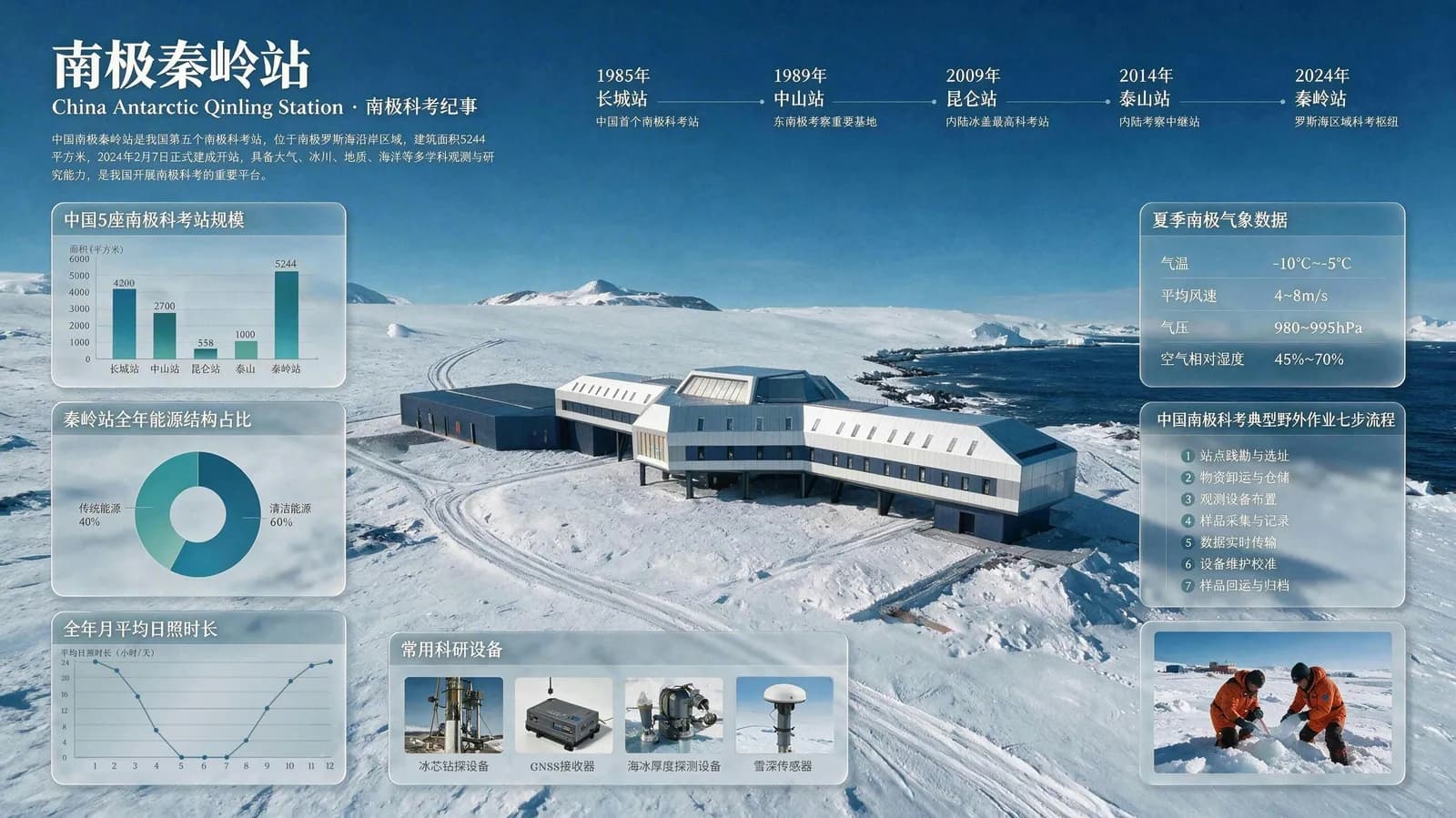
Plans the layout itself and turns data, concepts and long copy into high-density infographics, posters and UI mockups — with charts, timelines and dense text rendered in one pass.
Understands spatial position and regional semantics, so point, lasso and box selections, sketches, color codes and material swaps become local, pixel-level edits instead of full redraws.
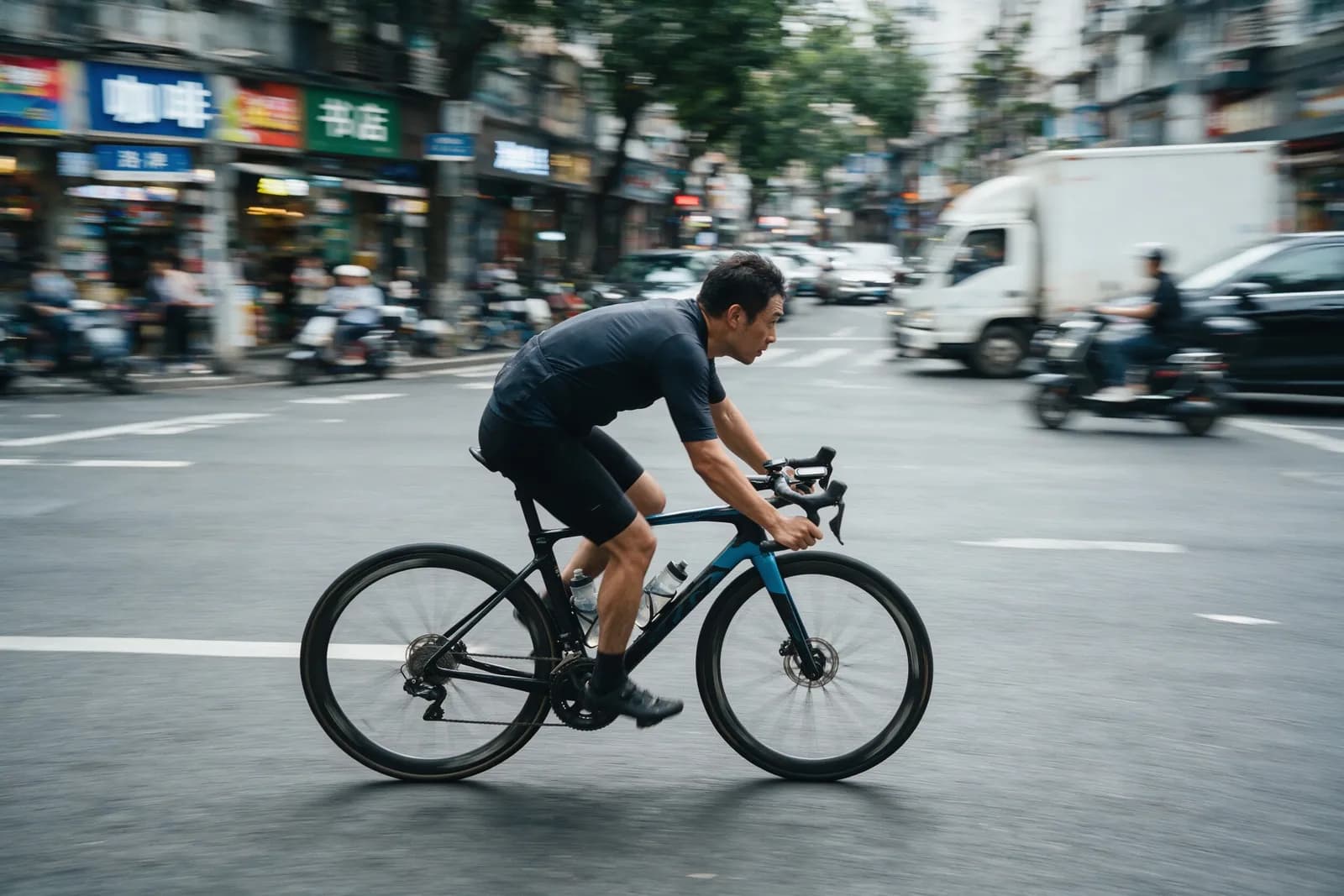
Reproduces real-world lighting, reflection, refraction and skin texture, from panning-shot motion blur to cinematic portraits and AAA-style character design.
Reads prompts and renders typography in more than ten languages, including right-to-left Arabic and accented Spanish, while adapting architecture, faces and clothing to the local culture.
New in Seedream 5.0
Send one image to seedream-5.0-pro-layer and get a clean base image plus up to 16 transparent PNG layers — text, subjects and decorations separated, with the area behind each subject inpainted.
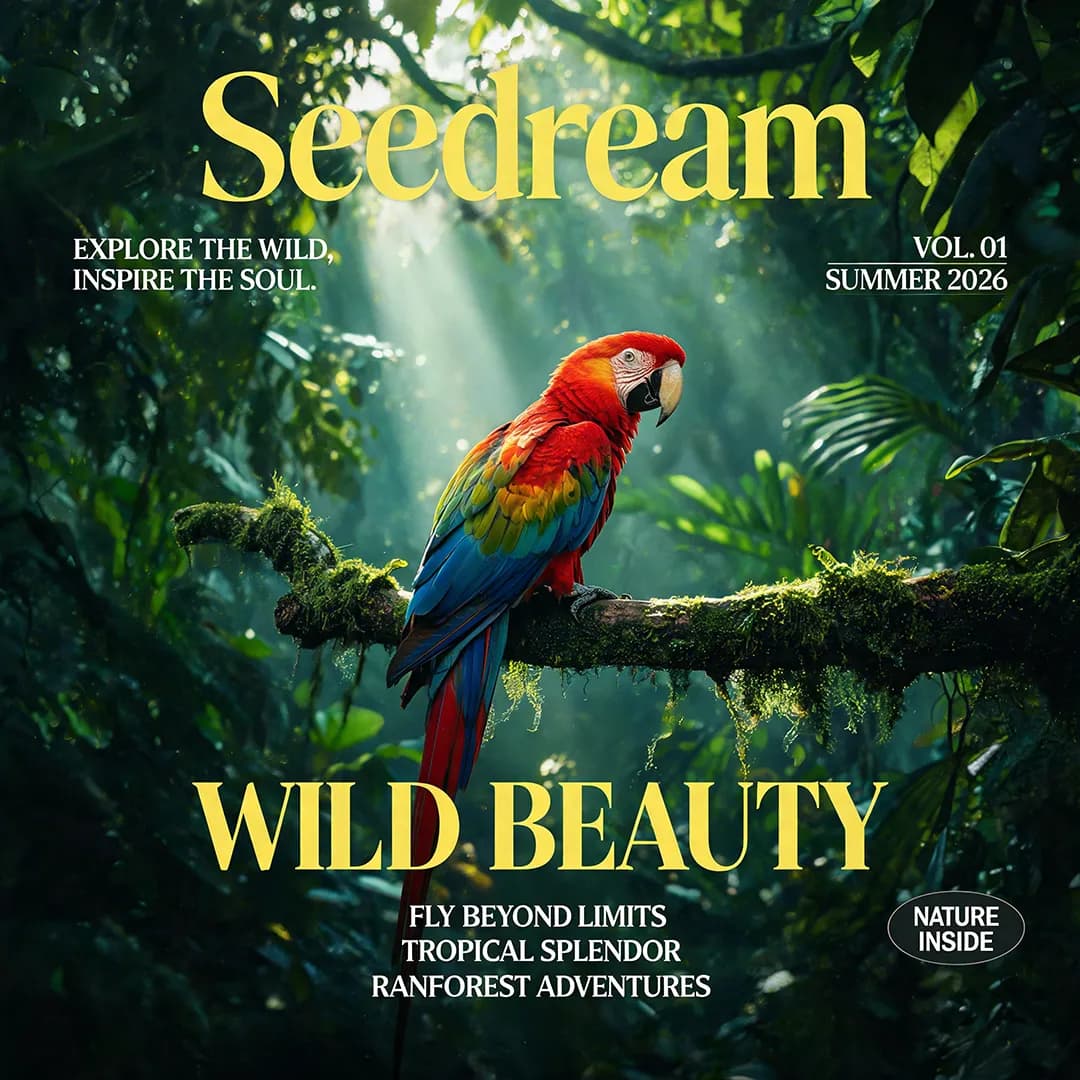
Pass the URL of one poster, cover or illustration in image_url. Optionally target text or subjects with <bbox>x1 y1 x2 y2</bbox> coordinates (0–1000 normalized) in the prompt.
The base image keeps the source aspect ratio; every extracted layer is a transparent PNG. Choose auto, 1K, 1.5K or 2K — auto keeps each layer's original size.
Each result carries z_index and bounding_box, so you can rebuild the composition in Figma, Photoshop or your own canvas, then move, scale or replace any element.
Task result (result array)
"result": [
  { "url": "https://…/base.jpeg", "z_index": 0 },
  {
    "url": "https://…/layer_1.png",
    "z_index": 1,
    "bounding_box": {
      "absolute": [384, 120, 1653, 382],
      "normalized": [188, 59, 807, 186]
    },
    "name": "Seedream title text",
    "description": "Yellow Seedream headline, no background"
  }
]
Layer decomposition is billed once per request, no matter how many layers are returned.
All three map to the same upstream model, doubao-seedream-5-0-pro-260628, and run through APIPod's asynchronous image API.
| Model ID | Mode | Input | Output | |
|---|---|---|---|---|
| seedream-5.0-pro | Text to image | Prompt | 1 image, 1K / 1.5K / 2K | Open model |
| seedream-5.0-pro-edit | Image editing & fusion | Prompt + 1–10 reference images | 1 image; transparent PNG supported for a single transparent input | Open model |
| seedream-5.0-pro-layer | Layer decomposition | Prompt + exactly 1 image | Base image + up to 16 transparent PNG layers with metadata | Open model |
Both share the same editing, layer and transparent-background capabilities. Pick Pro for maximum quality, Flash when latency matters.
| Spec | Seedream 5.0 Pro | Seedream 5.0 Flash |
|---|---|---|
| Upstream model | doubao-seedream-5-0-pro-260628 | doubao-seedream-5-0-flash-260915 |
| Positioning | Flagship quality for design and commercial work | Same capabilities, faster generation |
| Output tiers | 1K / 1.5K / 2K, custom W×H | 1K / 1.5K / 2K, custom W×H |
| Reference images | Up to 10 | Up to 10 |
| Layer decomposition | seedream-5.0-pro-layer | seedream-5.0-flash-layer |
| Transparent background | Yes (1 transparent input, PNG output) | Yes (1 transparent input, PNG output) |
| Images per request | 1 (layer mode: base + layers) | 1 (layer mode: base + layers) |
Seedream 5.0 Pro and Flash do not support group (sequential) generation, web search or streaming output.
Explore the Seedream 5.0 Flash APIPricing
Pay per generated image with no subscription. The live price of every model is shown on its model card and on the APIPod pricing page.
Billed per output image. 1.5K is priced the same as 1K.
Billed per output image. The first input image is free; each additional reference image costs $0.0025.
One fixed price per request, regardless of the number of layers returned.
Failed tasks are refunded automatically. Prices are in USD.
See full pricingOfficial examples
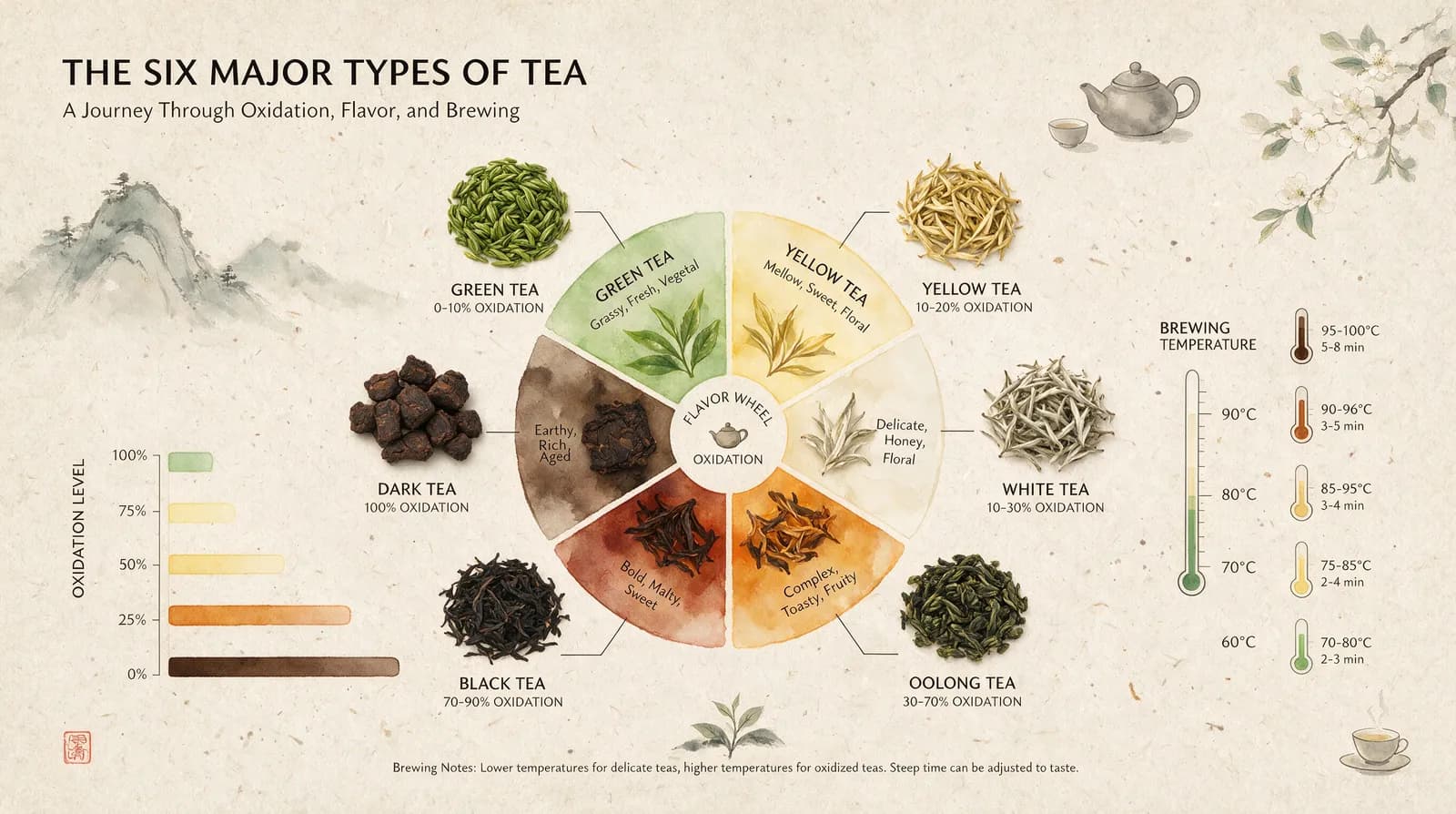
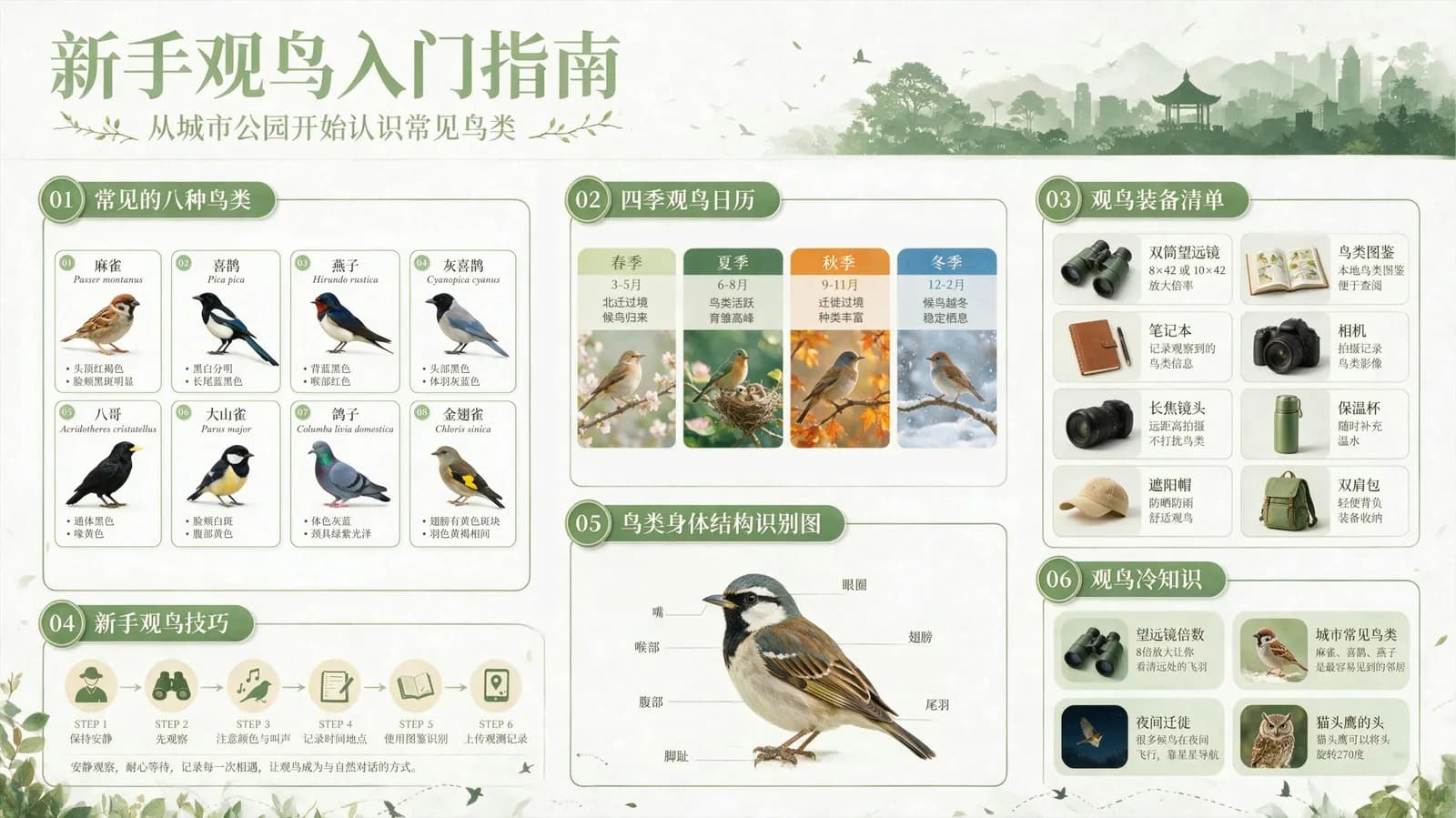
Each image below was published by ByteDance Seed together with the exact prompt that produced it.
Prompt
Infographic of six major teas, central delicate watercolor gradient flavor wheel. Surrounding top-down tea leaf shots show varying oxidation, connected to oxidation bars & brew temp thermometers. Textured handmade rice paper backdrop, minimalist zen refined balanced layout.
Prompt
Generate a natural-science infographic titled "A Beginner's Guide to Birdwatching". Use a fresh color palette, grid layout to showcase 8 common bird species, each with a scientific illustration, English and Chinese names, and key identifying features.
Prompt
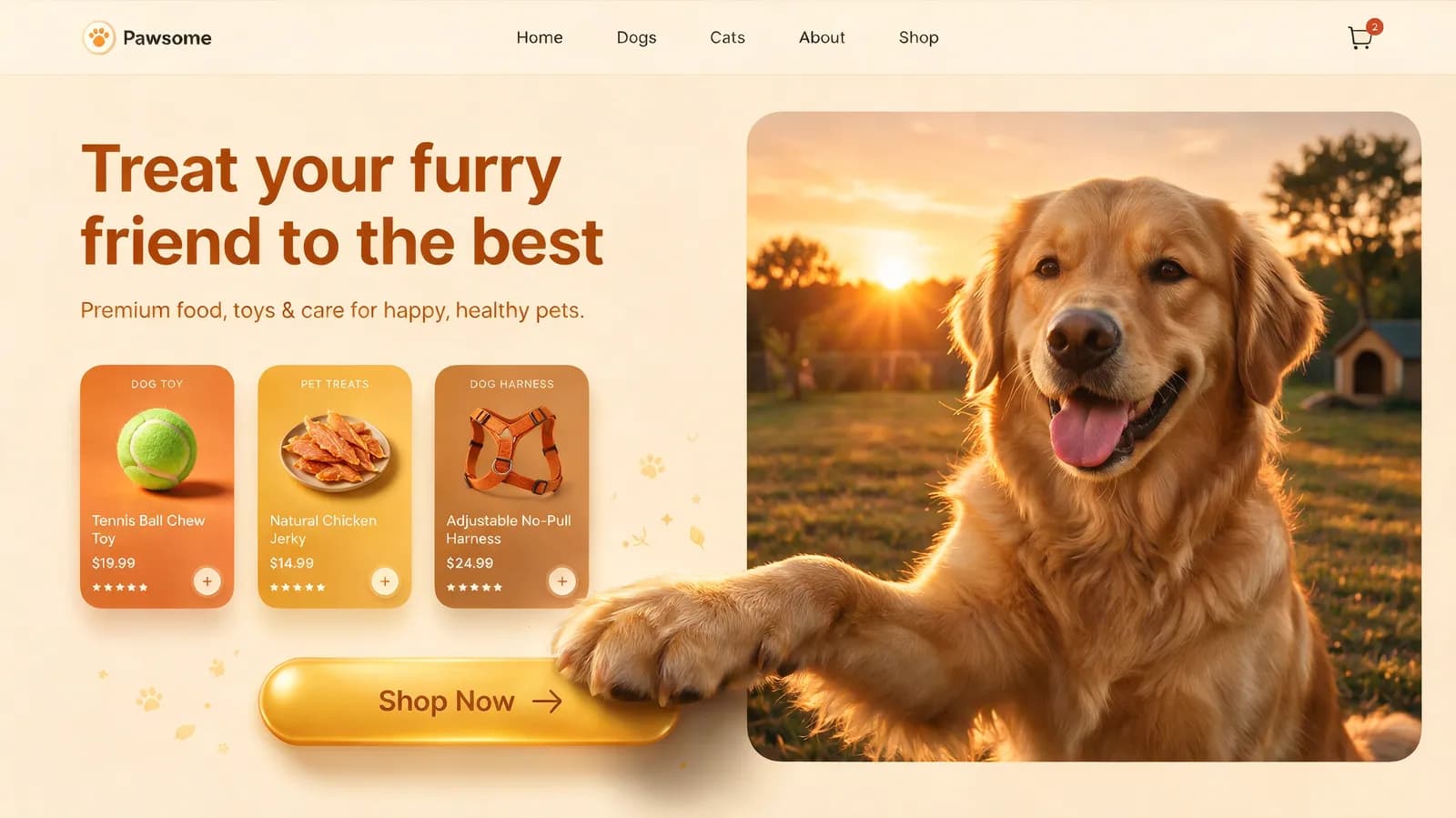
A 16:9 pet e-commerce homepage UI in warm sunset tones with layered shadows. It features a top navigation bar. The left side has a cream-beige background containing text copy, product cards, and a golden capsule-shaped button. On the right, there is an image of a Golden Retriever with a 3D effect: The dog's front paw breaks out of the right frame and rests directly on the left button.
Prompt
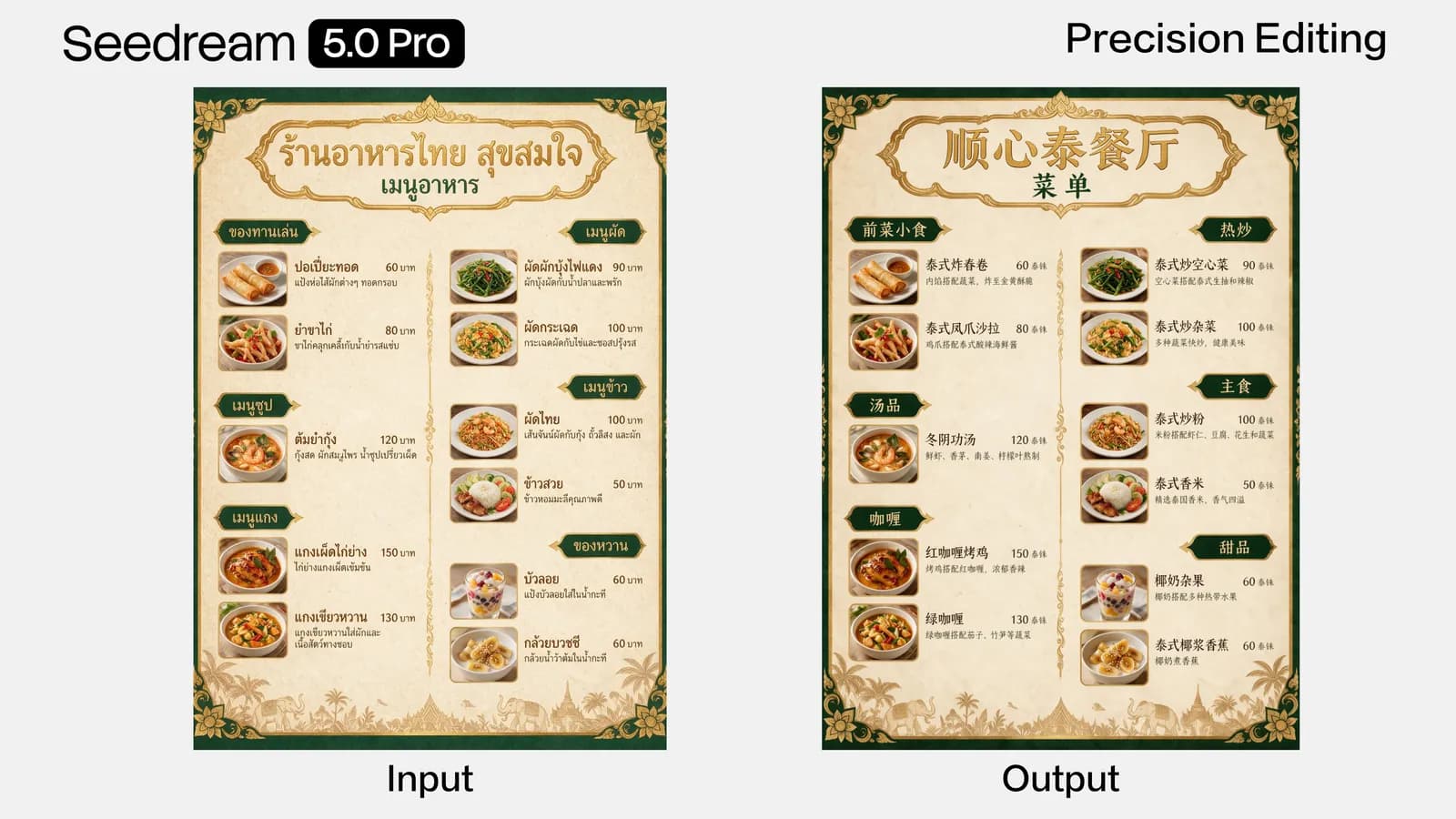
Translate the menu into Chinese.
Prompt
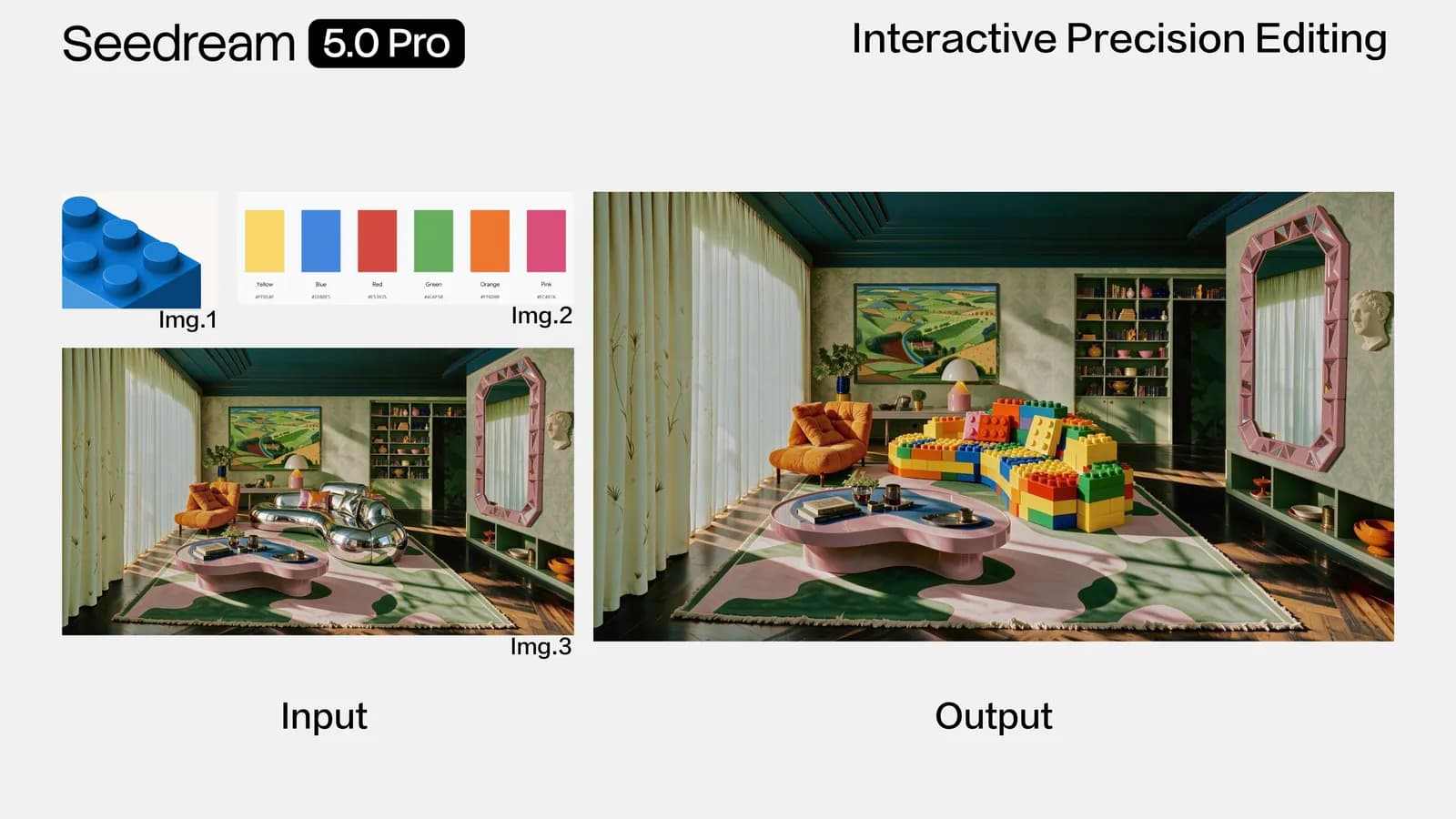
Using the material from Image 1 and the color swatch from Image 2, modify the sofa in Image 3.
Prompt
A panning shot of a cyclist. The rider and the bicycle are clear and sharp, the background street is stretched into horizontal motion blur, and the wheel spokes have rotational blur to convey a sense of speed.
Images and prompts: ByteDance Seed, “Introducing Seedream 5.0 Pro” (July 8, 2026).
Quickstart
Submit a task, poll the status and read the result. Switch between text-to-image, editing and layer decomposition by changing the model ID.
For layer results, each item in result is an object with the layer url, z_index, bounding_box, name and description. Full parameters are in the Seedream 5.0 Pro docs.
import os, time, requests

headers = {"Authorization": f"Bearer {os.environ['APIPOD_API_KEY']}"}
payload = {
  "model": "seedream-5.0-pro-layer",   # or seedream-5.0-pro / seedream-5.0-pro-edit
  "prompt": "Separate the title text <bbox>180 64 812 198</bbox> and the parrot <bbox>347 305 642 997</bbox> into layers",
  "image_url": "https://example.com/poster.png",
  "quality": "auto",                    # auto / 1K / 1.5K / 2K
}

resp = requests.post("https://api.apipod.ai/v1/images/generations", json=payload, headers=headers)
task_id = resp.json()["data"]["task_id"]

while True:
  data = requests.get(f"https://api.apipod.ai/v1/images/status/{task_id}", headers=headers).json()["data"]
  if data["status"] in ("completed", "failed"):
    for layer in data.get("result", []):
      print(layer["z_index"], layer.get("name"), layer["url"])
    break
  time.sleep(2)
Seedream 5.0 Pro is ByteDance Seed's multimodal image creation model, officially launched on July 8, 2026 after debuting at the Volcano Engine FORCE conference. It focuses on professional design work: dense infographics, accurate multilingual text, interactive precision editing, realistic textures and layer decomposition.
Create an APIPod API key, then send a request to /v1/images/generations with model set to seedream-5.0-pro, seedream-5.0-pro-edit or seedream-5.0-pro-layer. Tasks are asynchronous: poll /v1/images/status/{task_id} or set a callback_url to receive the result.
Send exactly one image to seedream-5.0-pro-layer. The model returns a base image plus up to 16 transparent PNG layers. Each item in the result array is an object with url, z_index (0 is the base), a bounding_box in pixel and 0–1000 normalized coordinates, a name and a description, so you can rebuild or re-edit the design.
They share the same capabilities — generation, multi-image editing, interactive editing, layer decomposition and transparent backgrounds. Pro targets the highest quality, while Flash (doubao-seedream-5-0-flash-260915) generates faster for latency-sensitive workloads.
Choose 1K, 1.5K or 2K together with aspect ratios such as 1:1, 4:3, 3:4, 16:9, 9:16, 3:2, 2:3 and 21:9, or pass a custom size between 921,600 and 4,624,220 total pixels with an aspect ratio from 1:16 to 16:1. Layer decomposition accepts auto, 1K, 1.5K or 2K and keeps the source aspect ratio.
Yes. With seedream-5.0-pro-edit, set background to transparent and provide exactly one image that already has an alpha channel; the result is a PNG. Layer decomposition always returns its extracted layers as transparent PNGs.
APIPod bills per output image with no subscription, and 1.5K costs the same as 1K. For editing, the first input image is free and each extra reference image costs $0.0025. Layer decomposition is a fixed price per request. Current prices are listed on each model card and the pricing page.
One API key for Seedream 5.0 Pro, Flash and hundreds of other image, video and language models — pay as you go, with failed tasks refunded automatically.